July 2026
Zoom
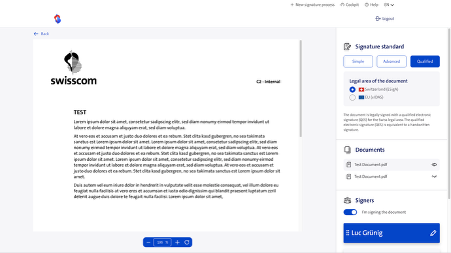
Swisscom Sign now allows users to zoom in or out on PDF documents using an intuitive zoom function. For multi-page documents, users can also scroll vertically to view the next pages. This feature is currently only available on desktop. The view remains the same on smartphones and mobile devices.
Signing with a passkey
Users can now complete the identification process for the Qualified Electronic Signature (QES) without downloading an app. The approval (second factor) of a signature also no longer requires an app.
Identification using the web-based flow is only possible during business hours (Monday–Saturday from 7:00 a.m. to 10:00 p.m. UTC+1). While NFC-enabled documents are permitted in the web-based process, the reading of biometric data (NFC chip) is not supported, which is why a manual verification of the data is required during each onboarding process. A passkey, which is stored directly in the keychain on your smartphone, is used as the authentication method or second factor. This has the advantage that your identification remains valid even if you switch smartphones.
By default, the app is still used as the primary means of identification. If the second option, “Passkey,” is enabled on the tenant, users can select which identification method they wish to use (app or Passkey) via the Swisscom Sign web portal. If signature processes are initiated via the API, the desired identification method can be specified directly in the request.
Please note that this feature is currently available only to corporate customers with their own tenant (Corporate package). None of the self-service plans (including Starter, Basic, Plus, and Premium) support this feature. A one-time order and activation are required. If you are interested, please contact your Key Account Manager.
Related API version: 2.19.0